Kubernetes errors I see every week, and how I fix them
CrashLoopBackOff, ImagePullBackOff, Pending. A practical fix list, with a cheat sheet.
CrashLoopBackOff, ImagePullBackOff, Pending. A practical fix list, with a cheat sheet.
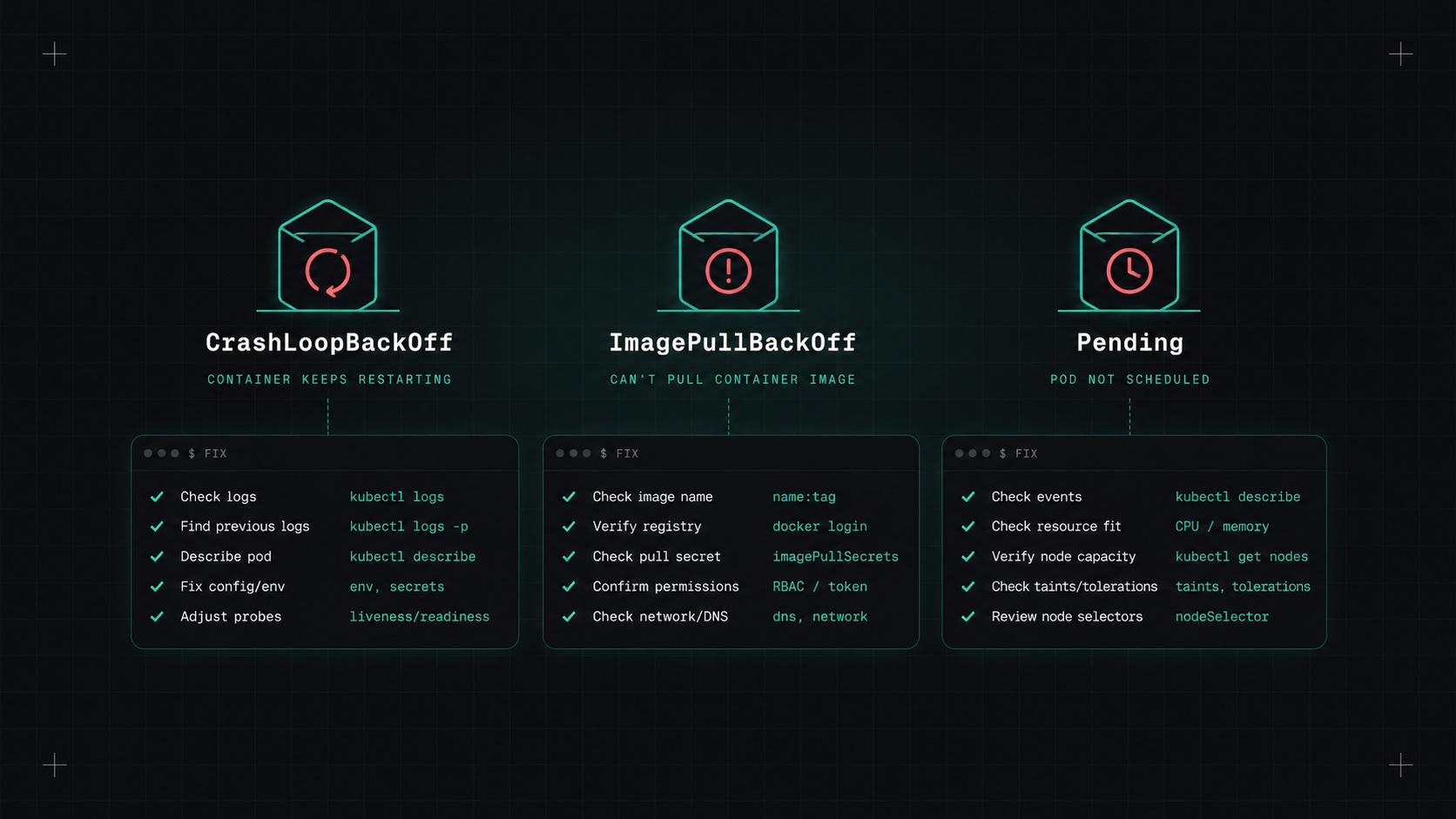
Kubernetes error messages have a special talent: they tell you that something is wrong, in capital letters, without telling you why. CrashLoopBackOff. ImagePullBackOff. Pending. If you work with Kubernetes, you'll see these every week.
The good news: the same few causes explain most of these errors. Here's my usual debugging process and the fixes I try first.
Whatever the error, I start with the same three commands:
kubectl get pods -n shop                 # what state is it in?
kubectl describe pod <pod> -n shop       # events at the bottom tell the story
kubectl logs <pod> -n shop --previous    # logs from the crashed container
The Events section at the bottom of kubectl describe is the most underrated debugging tool in Kubernetes. Nine times out of ten, the answer is there.
For the bigger picture:
kubectl get events -n shop --sort-by=.lastTimestamp
The container starts, crashes, Kubernetes restarts it, it crashes again, and Kubernetes waits longer and longer between attempts.
Common causes:
- The application itself fails at startup: missing config, wrong environment variable, can't reach the database.
- A missing secret or ConfigMap key.
- Liveness probe kills the container before it finishes starting.
- Out of memory at startup (check for OOMKilled).
Fix: kubectl logs --previous shows why the last run died. If the logs are empty, the process probably crashed before logging anything: check the command, the entrypoint, and the image.
Kubernetes can't download the container image.
Common causes:
- Typo in the image name or tag.
- The tag doesn't exist (it was never pushed, or was deleted).
- Private registry without an imagePullSecret, or an expired one.
- Rate limits from the registry.
- The node can't reach the registry (network, proxy, firewall).
Fix: the event message usually says exactly which one: "not found", "unauthorized", or "toomanyrequests".
The pod was created but no node will run it.
Common causes: - Not enough CPU or memory on any node for the pod's requests. - Node selectors, affinity rules or taints that no node matches. - A PersistentVolumeClaim that can't be bound (wrong StorageClass, wrong zone). - The cluster autoscaler hasn't added a node yet, or can't.
Fix: kubectl describe pod shows a message like "0/5 nodes are available: 3 Insufficient memory, 2 node(s) had untolerated taint". That tells you exactly what to change.
The container used more memory than its limit and was killed. Exit code 137.
Fix: check actual memory usage, then either raise the limit or fix the leak. Make sure the language runtime knows about the container's memory limit.
The node ran low on memory or disk and removed pods to protect itself.
Fix: set proper memory requests, check for pods writing huge logs or temporary files, and look at node disk usage. Clean up old evicted pods with kubectl delete pod --field-selector=status.phase=Failed.
Usually a referenced Secret or ConfigMap (or a key inside it) doesn't exist. The event names it.
The container runs but Kubernetes doesn't send traffic to it.
Fix: check the probe path and port, and test it from inside the pod. Make sure the probe doesn't depend on external services that might be slow.
Kubernetes almost always tells you what's wrong. It just puts the answer at the bottom of
kubectl describe.
"It works in the pod but not through the service" is its own category.
# Does the Service have endpoints?
kubectl get endpointslices -n shop -l kubernetes.io/service-name=shop-api

# Test from inside the cluster
kubectl run tmp --rm -it --image=busybox:1.36 -- sh
# then: wget -qO- http://shop-api.shop.svc.cluster.local:8080/health
Common causes:
- No endpoints: the Service selector doesn't match the pod labels. Very common after a rename.
- Wrong port: port vs targetPort mix-up.
- NetworkPolicy blocking traffic. If any policy selects a pod, everything not explicitly allowed is denied.
- DNS: check that CoreDNS pods are healthy, and use the full service name across namespaces.
kubectl debug starts an ephemeral debug container in a running pod, even if the image has no shell. Essential for distroless images.kubectl exec for images that do have a shell.kubectl port-forward to test a service from your laptop.| Status | First thing to check |
|---|---|
| CrashLoopBackOff | kubectl logs --previous |
| ImagePullBackOff | Event message: name, tag, credentials, rate limit |
| Pending | describe events: resources, taints, PVC |
| OOMKilled | Memory usage vs limit |
| Evicted | Node memory/disk pressure, missing requests |
| CreateContainerConfigError | Missing Secret/ConfigMap or key |
| Not Ready | Readiness probe path, port and dependencies |
| Service unreachable | Endpoints, selector labels, ports, NetworkPolicy, DNS |
My take: learn to read events and previous logs, and most Kubernetes mysteries solve themselves in minutes.
— Desly