Goodbye passwords
Passkeys are the biggest change to how we log in since the password itself. Here's what they are, why they're safer, and how to start using them today.
Passkeys are the biggest change to how we log in since the password itself. Here's what they are, why they're safer, and how to start using them today.
Passkeys sind die größte Veränderung beim Einloggen seit dem Passwort selbst. Was sie sind, warum sie sicherer sind und wie du heute damit anfängst.
പാസ്വേഡ് വന്നതിനുശേഷം നമ്മൾ ലോഗിൻ ചെയ്യുന്ന രീതിയിലെ ഏറ്റവും വലിയ മാറ്റമാണ് പാസ്കീകൾ. അവ എന്താണ്, എന്തുകൊണ്ട് സുരക്ഷിതം, ഇന്നുതന്നെ എങ്ങനെ ഉപയോഗിച്ചുതുടങ്ങാം എന്ന്.
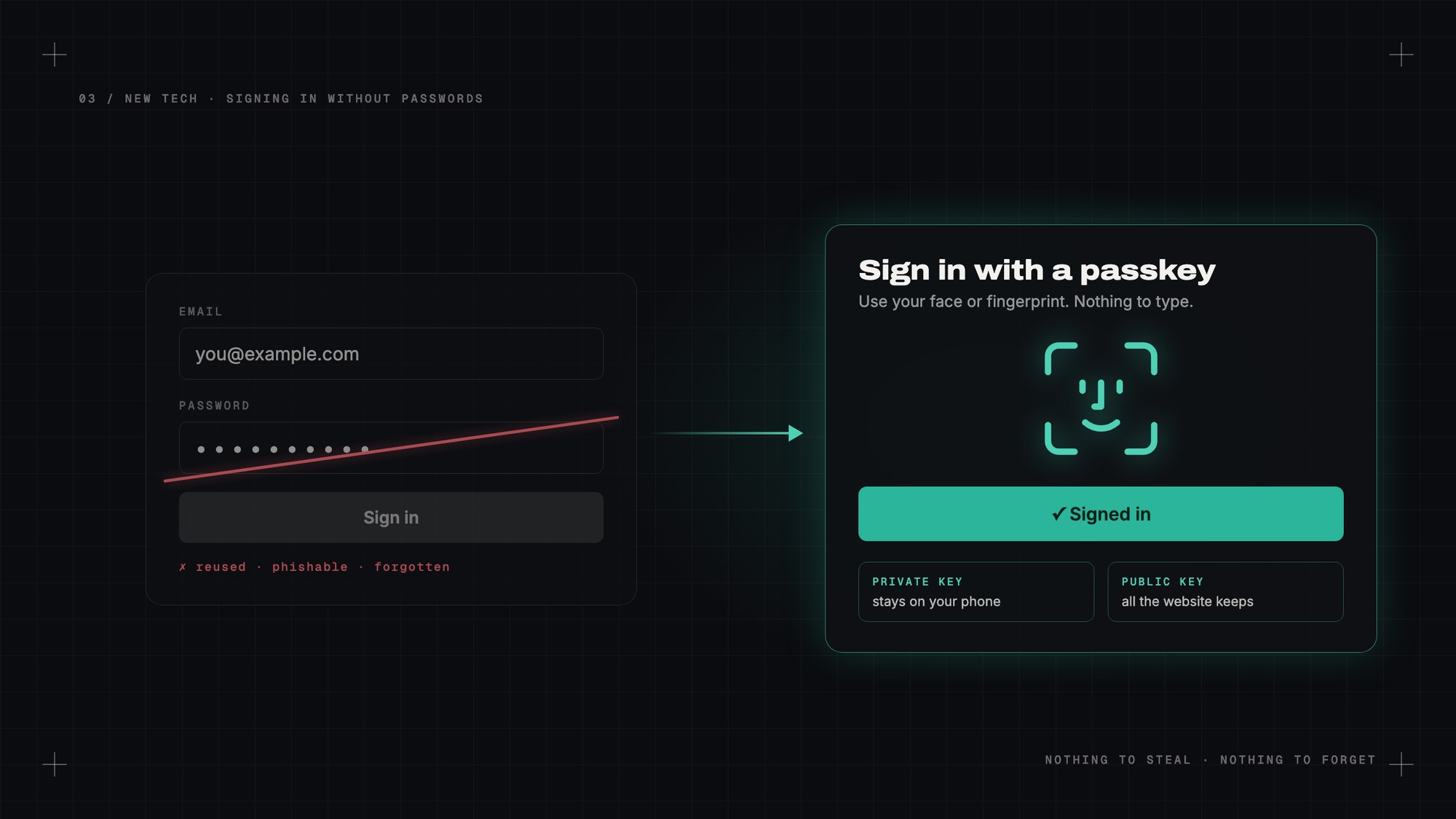
How many passwords do you have? Be honest. Now, how many of them are actually different?
Most of us have a few favourites that we reuse with small changes. A capital letter here, an exclamation mark there, the year at the end. We know it's bad. We do it anyway, because nobody can remember two hundred random strings of characters.
Working in DevOps, I see the other side of this too. A huge share of security problems still start with a stolen or guessed password. Not clever hacking, just someone typing the right word into the wrong website.
Passkeys are the first real fix I've seen for this. And the good news: you can start using them today.
A passkey replaces your password with something you don't have to remember, and that can't be stolen from the website.
When you create a passkey for a website, your phone or computer makes a matching pair of digital keys. One is private and never leaves your device. The other is public, and that's all the website stores.
When you sign in, the website sends a little challenge. Your device answers it with the private key, after you unlock it with your face, fingerprint or PIN. The website checks the answer with the public key. If it matches, you're in.
No password is typed. No password is sent. No password is stored on the server.
The website keeps a lock. Only your phone has the key.
Nothing to steal from the website. When a company gets hacked and its password database leaks, millions of accounts are suddenly at risk. With passkeys, all the hackers get is public keys. They're useless on their own.
Phishing stops working. This is the big one. A fake login page can trick a human into typing a password. It can't trick a passkey, because a passkey is tied to the real website's address. If the site isn't really your bank, your phone simply won't offer the passkey.
Nothing to reuse. Every passkey is unique to one website. One leak can't unlock the rest of your life.
Nothing to forget. You unlock your phone dozens of times a day anyway. Signing in feels exactly like that.
Passkeys are built on a standard from the FIDO Alliance, and Apple, Google and Microsoft all committed to supporting them together. That's rare, and it's why this is actually happening.
On an iPhone or Mac, passkeys are saved in your Apple account's keychain and sync between your devices. On Android and Chrome, they're saved in Google Password Manager. Windows has them too. Password managers like 1Password and Bitwarden can store them as well, which helps if you use a mix of devices.
A growing list of big services already let you sign in with one: Google, Apple, Microsoft, Amazon, PayPal, GitHub, WhatsApp and many more. Microsoft has even started making new accounts passwordless by default.
Pick the account that matters most. Usually that's your main email, because email is the key that resets everything else.
Go to the security settings of that account and look for "passkeys" or "sign in with a passkey". Click create, confirm with your face or fingerprint, and you're done. Next time you sign in, your device will offer the passkey instead of asking for a password.
On a computer that isn't yours, many sites can show a QR code. Scan it with your phone, approve it there, and you're signed in, without typing anything on that computer.
It's not perfect yet.
Switching ecosystems can be awkward. If all your passkeys live in Apple's keychain and you move to Android, moving them over has historically been a pain. The industry is working on a standard way to transfer them, but it's still early.
Not every site supports them. Plenty of websites still only take passwords. You'll live in a mixed world for a while.
Losing your devices needs a plan. Because passkeys sync through your account, losing one phone is fine. Losing access to your whole Apple or Google account is not. Set up account recovery properly, with a recovery contact or recovery key.
It can be confusing. Different sites word it differently, and sometimes they still ask for a password "just in case". It will get smoother.
Not overnight. Passwords have been around since the earliest days of computing and they'll stick around for a long time on older sites. But for the accounts that matter most, I think within a few years typing a password will feel as old-fashioned as writing a cheque.
I've started switching my important accounts over. The first time I signed in with just my face, on a site that used to need a long password and a code from my phone, it honestly felt like cheating.
My take: set up a passkey for your email today. It's the five minutes of security you'll never regret.
— Desly
Wie viele Passwörter hast du? Sei ehrlich. Und wie viele davon sind wirklich unterschiedlich?
Die meisten von uns haben ein paar Lieblinge, die wir mit kleinen Änderungen wiederverwenden. Hier ein Großbuchstabe, dort ein Ausrufezeichen, am Ende die Jahreszahl. Wir wissen, dass das schlecht ist. Wir machen es trotzdem, weil sich niemand zweihundert zufällige Zeichenketten merken kann.
Durch meine Arbeit im DevOps-Bereich sehe ich auch die andere Seite. Ein großer Teil der Sicherheitsprobleme beginnt immer noch mit einem gestohlenen oder erratenen Passwort. Kein raffiniertes Hacking, nur jemand, der das richtige Wort auf der falschen Website eintippt.
Passkeys sind die erste echte Lösung dafür, die ich gesehen habe. Und die gute Nachricht: Du kannst sie heute schon nutzen.
Ein Passkey ersetzt dein Passwort durch etwas, das du dir nicht merken musst und das niemand von der Website stehlen kann.
Wenn du einen Passkey für eine Website erstellst, erzeugt dein Handy oder Computer ein passendes Paar digitaler Schlüssel. Einer ist privat und verlässt nie dein Gerät. Der andere ist öffentlich, und nur ihn speichert die Website.
Beim Anmelden schickt die Website eine kleine Aufgabe. Dein Gerät beantwortet sie mit dem privaten Schlüssel, nachdem du es mit Gesicht, Fingerabdruck oder PIN entsperrt hast. Die Website prüft die Antwort mit dem öffentlichen Schlüssel. Passt sie, bist du drin.
Kein Passwort wird getippt. Kein Passwort wird gesendet. Kein Passwort liegt auf dem Server.
Die Website hat das Schloss. Den Schlüssel hat nur dein Handy.
Nichts zu stehlen bei der Website. Wenn eine Firma gehackt wird und ihre Passwortdatenbank durchsickert, sind plötzlich Millionen Konten in Gefahr. Mit Passkeys bekommen die Angreifer nur öffentliche Schlüssel. Allein sind die nutzlos.
Phishing funktioniert nicht mehr. Das ist der große Punkt. Eine gefälschte Login-Seite kann einen Menschen dazu bringen, ein Passwort einzugeben. Einen Passkey kann sie nicht täuschen, weil er an die Adresse der echten Website gebunden ist. Ist die Seite nicht wirklich deine Bank, bietet dein Handy den Passkey gar nicht erst an.
Nichts wiederzuverwenden. Jeder Passkey gehört zu genau einer Website. Ein Leck kann nicht den Rest deines Lebens aufschließen.
Nichts zu vergessen. Du entsperrst dein Handy ohnehin dutzende Male am Tag. Das Anmelden fühlt sich genau so an.
Passkeys beruhen auf einem Standard der FIDO Alliance, und Apple, Google und Microsoft haben sich gemeinsam verpflichtet, sie zu unterstützen. Das ist selten, und genau deshalb passiert es wirklich.
Auf iPhone oder Mac werden Passkeys im Schlüsselbund deines Apple-Accounts gespeichert und zwischen deinen Geräten synchronisiert. Auf Android und in Chrome landen sie im Google Passwortmanager. Windows hat sie auch. Passwortmanager wie 1Password und Bitwarden können sie ebenfalls speichern, was hilft, wenn du verschiedene Geräte nutzt.
Eine wachsende Liste großer Dienste erlaubt schon die Anmeldung mit Passkey: Google, Apple, Microsoft, Amazon, PayPal, GitHub, WhatsApp und viele mehr. Microsoft hat sogar begonnen, neue Konten standardmäßig passwortlos anzulegen.
Such dir das wichtigste Konto aus. Meist ist das deine Haupt-E-Mail, denn mit der E-Mail lässt sich alles andere zurücksetzen.
Geh in die Sicherheitseinstellungen dieses Kontos und such nach „Passkeys“ oder „Mit Passkey anmelden“. Auf Erstellen klicken, mit Gesicht oder Fingerabdruck bestätigen, fertig. Beim nächsten Anmelden bietet dein Gerät den Passkey an, statt nach dem Passwort zu fragen.
An einem Computer, der nicht dir gehört, zeigen viele Seiten einen QR-Code. Mit dem Handy scannen, dort bestätigen, und du bist angemeldet, ohne an diesem Computer etwas einzutippen.
Es ist noch nicht perfekt.
Ein Wechsel des Ökosystems kann mühsam sein. Wenn all deine Passkeys in Apples Schlüsselbund liegen und du zu Android wechselst, war das Übertragen bisher eine Qual. Die Branche arbeitet an einem Standard dafür, aber es ist noch früh.
Nicht jede Seite unterstützt sie. Viele Websites nehmen noch nur Passwörter. Wir leben eine Weile in einer gemischten Welt.
Für verlorene Geräte braucht es einen Plan. Weil Passkeys über dein Konto synchronisiert werden, ist ein verlorenes Handy kein Problem. Den Zugang zu deinem ganzen Apple- oder Google-Konto zu verlieren dagegen schon. Richte die Kontowiederherstellung ordentlich ein, mit einem Wiederherstellungskontakt oder -schlüssel.
Es kann verwirrend sein. Jede Seite formuliert es anders, und manche fragen „sicherheitshalber“ trotzdem noch nach dem Passwort. Das wird sich einspielen.
Nicht über Nacht. Passwörter gibt es seit den Anfängen der Computer, und auf älteren Seiten werden sie noch lange bleiben. Aber bei den wichtigsten Konten wird sich das Eintippen eines Passworts in ein paar Jahren so altmodisch anfühlen wie das Ausstellen eines Schecks.
Ich habe angefangen, meine wichtigen Konten umzustellen. Als ich mich zum ersten Mal nur mit meinem Gesicht angemeldet habe, auf einer Seite, die früher ein langes Passwort und einen Code vom Handy verlangte, fühlte sich das ehrlich gesagt wie Schummeln an.
Mein Fazit: Richte heute einen Passkey für deine E-Mail ein. Fünf Minuten Sicherheit, die du nie bereuen wirst.
— Desly
നിങ്ങൾക്ക് എത്ര പാസ്വേഡുകളുണ്ട്? സത്യം പറയൂ. ഇനി, അവയിൽ എത്രയെണ്ണം ശരിക്കും വ്യത്യസ്തമാണ്?
നമ്മളിൽ മിക്കവർക്കും ചെറിയ മാറ്റങ്ങളോടെ വീണ്ടും വീണ്ടും ഉപയോഗിക്കുന്ന ചില പ്രിയപ്പെട്ടവയുണ്ട്. ഇവിടെ ഒരു വലിയ അക്ഷരം, അവിടെ ഒരു ആശ്ചര്യചിഹ്നം, അവസാനം വർഷം. ഇത് മോശമാണെന്ന് നമുക്കറിയാം. എന്നിട്ടും ചെയ്യുന്നു, കാരണം ഇരുന്നൂറ് ക്രമരഹിത അക്ഷരക്കൂട്ടങ്ങൾ ആർക്കും ഓർക്കാൻ കഴിയില്ല.
DevOps-ൽ ജോലി ചെയ്യുന്നതുകൊണ്ട്, ഇതിന്റെ മറുവശവും ഞാൻ കാണുന്നു. സുരക്ഷാ പ്രശ്നങ്ങളുടെ വലിയൊരു പങ്കും ഇപ്പോഴും തുടങ്ങുന്നത് മോഷ്ടിക്കപ്പെട്ടതോ ഊഹിച്ചെടുത്തതോ ആയ ഒരു പാസ്വേഡിൽ നിന്നാണ്. മിടുക്കൻ ഹാക്കിംഗ് അല്ല, ആരോ ശരിയായ വാക്ക് തെറ്റായ വെബ്സൈറ്റിൽ ടൈപ്പ് ചെയ്യുന്നത് മാത്രം.
ഇതിനുള്ള ആദ്യത്തെ യഥാർത്ഥ പരിഹാരമായി ഞാൻ കാണുന്നത് പാസ്കീകളെയാണ്. നല്ല വാർത്ത: ഇന്നുതന്നെ നിങ്ങൾക്ക് അവ ഉപയോഗിച്ചുതുടങ്ങാം.
നിങ്ങൾ ഓർക്കേണ്ടതില്ലാത്ത, വെബ്സൈറ്റിൽ നിന്ന് മോഷ്ടിക്കാൻ കഴിയാത്ത ഒന്നുകൊണ്ട് പാസ്കീ നിങ്ങളുടെ പാസ്വേഡിനെ മാറ്റിസ്ഥാപിക്കുന്നു.
ഒരു വെബ്സൈറ്റിനായി പാസ്കീ ഉണ്ടാക്കുമ്പോൾ, നിങ്ങളുടെ ഫോണോ കമ്പ്യൂട്ടറോ ഒരു ജോഡി ഡിജിറ്റൽ കീകൾ ഉണ്ടാക്കുന്നു. ഒന്ന് പ്രൈവറ്റ് ആണ്, അത് ഒരിക്കലും നിങ്ങളുടെ ഉപകരണം വിട്ടുപോകില്ല. മറ്റേത് പബ്ലിക് ആണ്, വെബ്സൈറ്റ് സൂക്ഷിക്കുന്നത് അത് മാത്രമാണ്.
സൈൻ ഇൻ ചെയ്യുമ്പോൾ, വെബ്സൈറ്റ് ഒരു ചെറിയ വെല്ലുവിളി അയയ്ക്കുന്നു. നിങ്ങളുടെ മുഖം, വിരലടയാളം അല്ലെങ്കിൽ PIN ഉപയോഗിച്ച് അൺലോക്ക് ചെയ്തശേഷം, നിങ്ങളുടെ ഉപകരണം പ്രൈവറ്റ് കീ ഉപയോഗിച്ച് മറുപടി നൽകുന്നു. വെബ്സൈറ്റ് പബ്ലിക് കീ ഉപയോഗിച്ച് മറുപടി പരിശോധിക്കുന്നു. ചേരുന്നുണ്ടെങ്കിൽ, നിങ്ങൾ അകത്ത്.
ഒരു പാസ്വേഡും ടൈപ്പ് ചെയ്യുന്നില്ല. ഒരു പാസ്വേഡും അയയ്ക്കുന്നില്ല. ഒരു പാസ്വേഡും സെർവറിൽ സൂക്ഷിക്കുന്നില്ല.
വെബ്സൈറ്റ് ഒരു പൂട്ട് സൂക്ഷിക്കുന്നു. താക്കോൽ നിങ്ങളുടെ ഫോണിൽ മാത്രം.
വെബ്സൈറ്റിൽ നിന്ന് മോഷ്ടിക്കാൻ ഒന്നുമില്ല. ഒരു കമ്പനി ഹാക്ക് ചെയ്യപ്പെട്ട് അതിന്റെ പാസ്വേഡ് ഡാറ്റാബേസ് ചോരുമ്പോൾ, ദശലക്ഷക്കണക്കിന് അക്കൗണ്ടുകൾ പെട്ടെന്ന് അപകടത്തിലാകുന്നു. പാസ്കീകൾ ഉപയോഗിച്ചാൽ, ഹാക്കർമാർക്ക് കിട്ടുന്നത് പബ്ലിക് കീകൾ മാത്രം. ഒറ്റയ്ക്ക് അവ ഉപയോഗശൂന്യമാണ്.
ഫിഷിംഗ് ഫലിക്കാതാകുന്നു. ഇതാണ് വലിയ കാര്യം. ഒരു വ്യാജ ലോഗിൻ പേജിന് ഒരു മനുഷ്യനെ കബളിപ്പിച്ച് പാസ്വേഡ് ടൈപ്പ് ചെയ്യിക്കാം. ഒരു പാസ്കീയെ കബളിപ്പിക്കാൻ കഴിയില്ല, കാരണം പാസ്കീ യഥാർത്ഥ വെബ്സൈറ്റിന്റെ വിലാസവുമായി ബന്ധിപ്പിച്ചിരിക്കുന്നു. സൈറ്റ് ശരിക്കും നിങ്ങളുടെ ബാങ്കല്ലെങ്കിൽ, നിങ്ങളുടെ ഫോൺ പാസ്കീ നൽകില്ല.
വീണ്ടും ഉപയോഗിക്കാൻ ഒന്നുമില്ല. ഓരോ പാസ്കീയും ഒരു വെബ്സൈറ്റിന് മാത്രമുള്ളതാണ്. ഒരു ചോർച്ചയ്ക്ക് നിങ്ങളുടെ ബാക്കി ജീവിതം തുറക്കാൻ കഴിയില്ല.
മറക്കാൻ ഒന്നുമില്ല. ദിവസവും ഡസൻ കണക്കിന് തവണ നിങ്ങൾ ഫോൺ അൺലോക്ക് ചെയ്യുന്നുണ്ടല്ലോ. സൈൻ ഇൻ ചെയ്യുന്നത് കൃത്യം അതുപോലെ തോന്നും.
FIDO Alliance-ന്റെ ഒരു സ്റ്റാൻഡേർഡിലാണ് പാസ്കീകൾ നിർമ്മിച്ചിരിക്കുന്നത്, Apple, Google, Microsoft എന്നിവ ഒരുമിച്ച് അവയെ പിന്തുണയ്ക്കാൻ പ്രതിജ്ഞാബദ്ധരായി. അത് അപൂർവമാണ്, ഇത് ശരിക്കും നടക്കുന്നതിന്റെ കാരണവും അതാണ്.
ഐഫോണിലോ മാക്കിലോ, പാസ്കീകൾ നിങ്ങളുടെ Apple അക്കൗണ്ടിന്റെ കീചെയിനിൽ സൂക്ഷിക്കപ്പെടുകയും ഉപകരണങ്ങൾക്കിടയിൽ സിങ്ക് ചെയ്യപ്പെടുകയും ചെയ്യുന്നു. Android-ലും Chrome-ലും, അവ Google Password Manager-ൽ സൂക്ഷിക്കപ്പെടുന്നു. Windows-ലും ഉണ്ട്. 1Password, Bitwarden പോലുള്ള പാസ്വേഡ് മാനേജർമാർക്കും അവ സൂക്ഷിക്കാം, പല ഉപകരണങ്ങൾ ഉപയോഗിക്കുന്നവർക്ക് അത് സഹായകമാണ്.
വലിയ സേവനങ്ങളുടെ ഒരു നീണ്ട ലിസ്റ്റ് ഇതിനകം പാസ്കീ ഉപയോഗിച്ച് സൈൻ ഇൻ ചെയ്യാൻ അനുവദിക്കുന്നു: Google, Apple, Microsoft, Amazon, PayPal, GitHub, WhatsApp എന്നിവയും മറ്റു പലതും. പുതിയ അക്കൗണ്ടുകൾ സ്വതവേ പാസ്വേഡില്ലാത്തതാക്കാൻ Microsoft തുടങ്ങിയിട്ടുമുണ്ട്.
ഏറ്റവും പ്രധാനപ്പെട്ട അക്കൗണ്ട് തിരഞ്ഞെടുക്കുക. സാധാരണയായി അത് നിങ്ങളുടെ പ്രധാന ഇമെയിലാണ്, കാരണം മറ്റെല്ലാം റീസെറ്റ് ചെയ്യുന്ന താക്കോൽ ഇമെയിലാണ്.
ആ അക്കൗണ്ടിന്റെ സെക്യൂരിറ്റി സെറ്റിംഗ്സിൽ പോയി "passkeys" അല്ലെങ്കിൽ "sign in with a passkey" എന്ന് നോക്കുക. ക്രിയേറ്റ് ക്ലിക്ക് ചെയ്യുക, മുഖം അല്ലെങ്കിൽ വിരലടയാളം കൊണ്ട് സ്ഥിരീകരിക്കുക, കഴിഞ്ഞു. അടുത്ത തവണ സൈൻ ഇൻ ചെയ്യുമ്പോൾ, പാസ്വേഡ് ചോദിക്കുന്നതിന് പകരം നിങ്ങളുടെ ഉപകരണം പാസ്കീ നൽകും.
നിങ്ങളുടേതല്ലാത്ത ഒരു കമ്പ്യൂട്ടറിൽ, പല സൈറ്റുകളും ഒരു QR കോഡ് കാണിക്കും. ഫോൺ കൊണ്ട് സ്കാൻ ചെയ്യുക, അവിടെ അംഗീകരിക്കുക, ആ കമ്പ്യൂട്ടറിൽ ഒന്നും ടൈപ്പ് ചെയ്യാതെ നിങ്ങൾ സൈൻ ഇൻ ആകും.
ഇത് ഇതുവരെ പൂർണ്ണമല്ല.
ഇക്കോസിസ്റ്റം മാറുന്നത് ബുദ്ധിമുട്ടാകാം. നിങ്ങളുടെ എല്ലാ പാസ്കീകളും Apple-ന്റെ കീചെയിനിലാണെങ്കിൽ, Android-ലേക്ക് മാറുമ്പോൾ അവ മാറ്റുന്നത് ഇതുവരെ ഒരു തലവേദനയായിരുന്നു. അവ കൈമാറാനുള്ള ഒരു സ്റ്റാൻഡേർഡ് രീതിയിൽ വ്യവസായം പ്രവർത്തിക്കുന്നുണ്ട്, പക്ഷേ ഇപ്പോഴും തുടക്കത്തിലാണ്.
എല്ലാ സൈറ്റുകളും പിന്തുണയ്ക്കുന്നില്ല. പല വെബ്സൈറ്റുകളും ഇപ്പോഴും പാസ്വേഡുകൾ മാത്രമേ സ്വീകരിക്കുന്നുള്ളൂ. കുറച്ചുകാലം ഒരു മിശ്ര ലോകത്തായിരിക്കും നമ്മൾ.
ഉപകരണങ്ങൾ നഷ്ടപ്പെടുന്നതിന് ഒരു പ്ലാൻ വേണം. പാസ്കീകൾ നിങ്ങളുടെ അക്കൗണ്ട് വഴി സിങ്ക് ചെയ്യുന്നതുകൊണ്ട്, ഒരു ഫോൺ നഷ്ടപ്പെടുന്നത് കുഴപ്പമില്ല. നിങ്ങളുടെ മുഴുവൻ Apple അല്ലെങ്കിൽ Google അക്കൗണ്ടിലേക്കുള്ള ആക്സസ് നഷ്ടപ്പെടുന്നത് അങ്ങനെയല്ല. ഒരു റിക്കവറി കോൺടാക്റ്റോ റിക്കവറി കീയോ ഉപയോഗിച്ച് അക്കൗണ്ട് റിക്കവറി ശരിയായി സെറ്റ് ചെയ്യുക.
ഇത് ആശയക്കുഴപ്പമുണ്ടാക്കാം. ഓരോ സൈറ്റും ഇത് വ്യത്യസ്തമായി പറയുന്നു, ചിലപ്പോൾ "എന്തിനും" എന്ന് പറഞ്ഞ് ഇപ്പോഴും പാസ്വേഡ് ചോദിക്കും. ഇത് കൂടുതൽ സുഗമമാകും.
ഒറ്റരാത്രി കൊണ്ടല്ല. കമ്പ്യൂട്ടിംഗിന്റെ ആദ്യകാലം മുതൽ പാസ്വേഡുകളുണ്ട്, പഴയ സൈറ്റുകളിൽ ഏറെക്കാലം അവ തുടരും. പക്ഷേ ഏറ്റവും പ്രധാനപ്പെട്ട അക്കൗണ്ടുകൾക്ക്, കുറച്ച് വർഷങ്ങൾക്കുള്ളിൽ പാസ്വേഡ് ടൈപ്പ് ചെയ്യുന്നത് ഒരു ചെക്ക് എഴുതുന്നതുപോലെ പഴഞ്ചനായി തോന്നുമെന്ന് ഞാൻ കരുതുന്നു.
എന്റെ പ്രധാന അക്കൗണ്ടുകൾ ഞാൻ മാറ്റിത്തുടങ്ങിയിട്ടുണ്ട്. നീണ്ട പാസ്വേഡും ഫോണിൽ നിന്നുള്ള കോഡും വേണ്ടിയിരുന്ന ഒരു സൈറ്റിൽ ആദ്യമായി മുഖം മാത്രം കൊണ്ട് സൈൻ ഇൻ ചെയ്തപ്പോൾ, സത്യത്തിൽ അത് ചതി ചെയ്യുന്നതുപോലെ തോന്നി.
എന്റെ അഭിപ്രായം: ഇന്നുതന്നെ നിങ്ങളുടെ ഇമെയിലിന് ഒരു പാസ്കീ സെറ്റ് ചെയ്യുക. ഒരിക്കലും പശ്ചാത്തപിക്കേണ്ടിവരാത്ത അഞ്ച് മിനിറ്റിന്റെ സുരക്ഷ.
— ഡെസ്ലി