Insta360 Link 2, six months later
Work meetings and recordings on my Mac. A webcam that makes people ask what camera you're using.
Work meetings and recordings on my Mac. A webcam that makes people ask what camera you're using.
Meetings und Aufnahmen an meinem Mac. Eine Webcam, bei der Leute fragen, welche Kamera du benutzt.
എന്റെ മാക്കിൽ ജോലി മീറ്റിംഗുകളും റെക്കോർഡിംഗുകളും. ഏത് ക്യാമറയാണ് ഉപയോഗിക്കുന്നതെന്ന് ആളുകളെക്കൊണ്ട് ചോദിപ്പിക്കുന്ന ഒരു വെബ്ക്യാം.
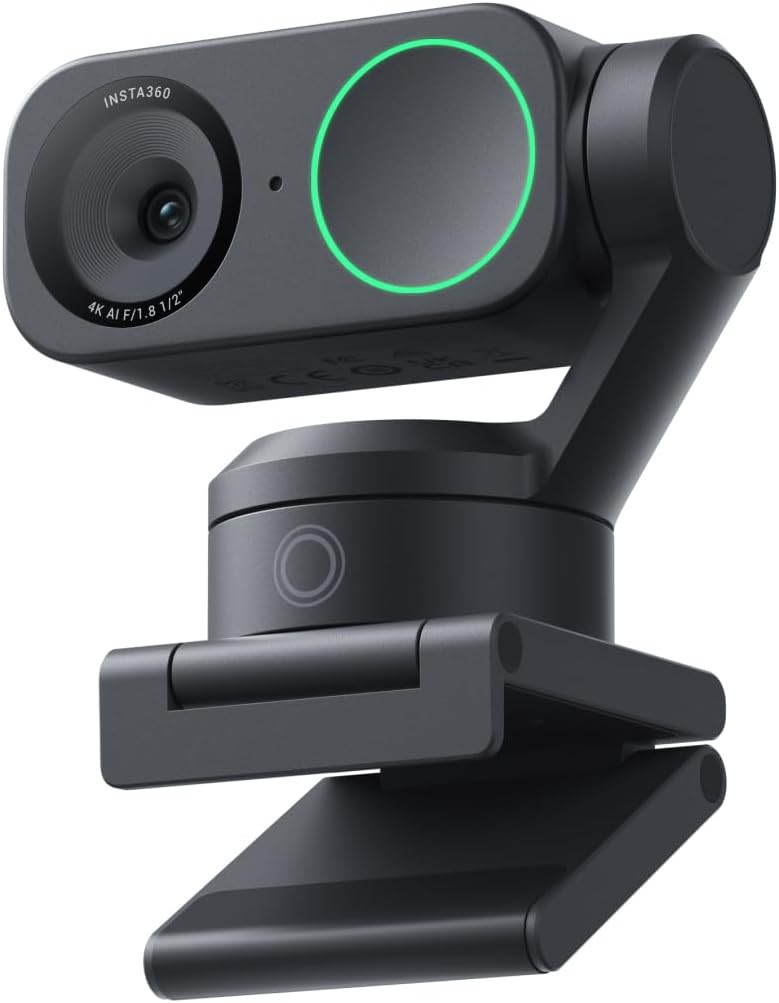
For about six months now, the Insta360 Link 2 has been sitting on top of my screen, plugged into my Mac. I use it every working day for meetings, and for recording videos. I bought it expecting a better picture than a normal webcam. What I didn't expect was how much the little gimbal and the smart features would change how I work on camera.
Short version: it's the best webcam I've used, and I don't say that lightly.
This is the first thing people notice. Colleagues have literally asked me what camera I'm using. The image is sharp, it records in 4K, and with HDR switched on, a bright window behind me doesn't blow everything out. Skin tones look natural, not orange or washed out the way cheaper webcams make you look.
Low light is where it really separates itself. Evening calls, a dim room, a single lamp on, and it still looks clean. That's thanks to a bigger 1/2-inch sensor and a bright f/1.8 lens, which is far more than most webcams have.
Colleagues have literally asked me what camera I'm using.
The camera sits on a small 2-axis gimbal, so it can physically turn and tilt to follow you. When I stand up, lean back or walk to grab something during a recording, it keeps me in frame. For recording videos this is brilliant, because I don't have to stay glued to one spot.
The gestures took me a day to get used to, and now I use them without thinking. Raise your hand and it starts or stops tracking, and you can zoom with a gesture too. It feels a bit like magic the first few times, and then it just becomes normal.
These two modes are underrated. Desk view tilts the camera down so you can show something on your desk: a sketch, a gadget, notes on paper. Whiteboard mode finds a whiteboard and straightens and enhances it so people can actually read it. For explaining things in meetings, both are genuinely useful, not gimmicks.
I honestly expected to keep using a separate microphone. I don't. The built-in mics sound clear, and the AI noise cancelling does a good job of removing background noise. There are three modes: Voice Focus, Voice Suppression and Music Balance. For meetings, Voice Focus is my default. People hear me, not the street outside.
It's plug and play over USB-C with my Mac. FaceTime, Zoom, Teams, everything recognised it immediately. The Insta360 Link Controller app is where you fine-tune things like tracking, modes and noise cancelling, and once it's set up, you rarely need to open it again.
Neither is a deal-breaker. The price is easier to accept once you realise you might not need a separate microphone. And for meetings and most recordings, 4K at 30 fps looks great. It's only for fast motion that I'd want 60.
| Sensor | 1/2" sensor |
|---|---|
| Lens | f/1.8, 26 mm equivalent, 79.5° diagonal field of view (67° horizontal) |
| Video | 4K at 30 fps, 1080p at 60 fps, HDR, landscape or portrait |
| Zoom & focus | Up to 4x digital zoom, autofocus from 10 cm |
| Gimbal | 2-axis (pan and tilt) with AI tracking |
| Smart modes | Gesture control, desk view, whiteboard mode, portrait mode, privacy mode |
| Audio | Built-in microphones with AI noise cancelling (Voice Focus, Voice Suppression, Music Balance) |
| Video formats | H.264 and MJPEG, 8-bit |
| Connection | USB-C |
| Weight | About 101.5 g (camera), 166.5 g with magnetic mount |
| Works with | Mac and Windows; Zoom, Teams, Google Meet, OBS and more |
| Software | Insta360 Link Controller |
Specifications from Insta360's support documentation and published reviews. Not to be confused with the Link 2 Pro, which has a larger 1/1.3" sensor.
If you spend a lot of your day on video calls, or you record yourself for videos and tutorials, the Link 2 is worth every cent. You look better, you sound better, and you're free to move. If you only join the odd call each week, a basic webcam will do the job for much less.
Six months in, it's the one piece of my desk setup that everyone on the other end notices. Pricey, but it earns it.
View the Insta360 Link 2 on Amazon ↗
— Desly
Seit etwa sechs Monaten sitzt die Insta360 Link 2 auf meinem Bildschirm, angeschlossen an meinen Mac. Ich nutze sie an jedem Arbeitstag für Meetings und für Videoaufnahmen. Gekauft habe ich sie in der Erwartung, ein besseres Bild als bei einer normalen Webcam zu bekommen. Was ich nicht erwartet hatte: wie sehr der kleine Gimbal und die smarten Funktionen verändern würden, wie ich vor der Kamera arbeite.
Kurz gesagt: Es ist die beste Webcam, die ich benutzt habe, und das sage ich nicht leichtfertig.
Das ist das Erste, was den Leuten auffällt. Kollegen haben mich tatsächlich gefragt, welche Kamera ich benutze. Das Bild ist scharf, sie nimmt in 4K auf, und mit eingeschaltetem HDR überstrahlt ein helles Fenster hinter mir nicht alles. Hauttöne wirken natürlich, nicht orange oder blass, wie bei günstigeren Webcams.
Bei wenig Licht hebt sie sich richtig ab. Abendliche Calls, ein dämmriger Raum, eine einzige Lampe, und das Bild ist trotzdem sauber. Das liegt am größeren 1/2-Zoll-Sensor und dem lichtstarken f/1.8-Objektiv, deutlich mehr, als die meisten Webcams haben.
Kollegen haben mich tatsächlich gefragt, welche Kamera ich benutze.
Die Kamera sitzt auf einem kleinen 2-Achsen-Gimbal und kann sich so tatsächlich drehen und neigen, um dir zu folgen. Wenn ich während einer Aufnahme aufstehe, mich zurücklehne oder etwas hole, bleibe ich im Bild. Für Videoaufnahmen ist das großartig, weil ich nicht an einer Stelle kleben muss.
An die Gesten musste ich mich einen Tag lang gewöhnen, jetzt nutze ich sie, ohne nachzudenken. Hand heben, und das Tracking startet oder stoppt, und zoomen kann man auch per Geste. Die ersten Male fühlt es sich ein bisschen wie Magie an, dann wird es einfach normal.
Diese beiden Modi werden unterschätzt. Die Schreibtischansicht neigt die Kamera nach unten, damit du etwas auf deinem Tisch zeigen kannst: eine Skizze, ein Gadget, Notizen auf Papier. Der Whiteboard-Modus erkennt ein Whiteboard, richtet es gerade aus und verbessert es, damit die Leute es wirklich lesen können. Um in Meetings etwas zu erklären, sind beide wirklich nützlich und keine Spielerei.
Ich dachte ehrlich gesagt, ich würde weiter ein separates Mikrofon brauchen. Tue ich nicht. Die eingebauten Mikros klingen klar, und die KI-Geräuschunterdrückung entfernt Hintergrundgeräusche gut. Es gibt drei Modi: Voice Focus, Voice Suppression und Music Balance. Für Meetings ist Voice Focus mein Standard. Die Leute hören mich, nicht die Straße draußen.
Am Mac ist sie per USB-C Plug and Play. FaceTime, Zoom, Teams, alles hat sie sofort erkannt. In der App Insta360 Link Controller stellt man Tracking, Modi und Geräuschunterdrückung fein ein, und wenn alles eingerichtet ist, muss man sie selten wieder öffnen.
Keins davon ist ein K.-o.-Kriterium. Der Preis lässt sich leichter akzeptieren, wenn man merkt, dass man vielleicht kein separates Mikrofon braucht. Und für Meetings und die meisten Aufnahmen sieht 4K mit 30 fps großartig aus. Nur bei schnellen Bewegungen würde ich mir 60 wünschen.
| Sensor | 1/2"-Sensor |
|---|---|
| Objektiv | f/1.8, 26 mm Äquivalent, 79,5° diagonales Sichtfeld (67° horizontal) |
| Video | 4K mit 30 fps, 1080p mit 60 fps, HDR, Quer- oder Hochformat |
| Zoom & Fokus | Bis zu 4-fach Digitalzoom, Autofokus ab 10 cm |
| Gimbal | 2 Achsen (Schwenken und Neigen) mit KI-Tracking |
| Smarte Modi | Gestensteuerung, Schreibtischansicht, Whiteboard-Modus, Porträtmodus, Privatsphäre-Modus |
| Audio | Eingebaute Mikrofone mit KI-Geräuschunterdrückung (Voice Focus, Voice Suppression, Music Balance) |
| Videoformate | H.264 und MJPEG, 8 Bit |
| Anschluss | USB-C |
| Gewicht | Etwa 101,5 g (Kamera), 166,5 g mit Magnethalterung |
| Kompatibel mit | Mac und Windows; Zoom, Teams, Google Meet, OBS und mehr |
| Software | Insta360 Link Controller |
Daten aus der Support-Dokumentation von Insta360 und veröffentlichten Tests. Nicht zu verwechseln mit der Link 2 Pro, die einen größeren 1/1,3"-Sensor hat.
Wenn du einen Großteil deines Tages in Videocalls verbringst oder dich für Videos und Tutorials aufnimmst, ist die Link 2 jeden Cent wert. Du siehst besser aus, klingst besser und kannst dich frei bewegen. Wenn du nur ab und zu an einem Call teilnimmst, tut es eine einfache Webcam für viel weniger Geld.
Nach sechs Monaten ist sie das eine Teil meines Schreibtisch-Setups, das jeder auf der anderen Seite bemerkt. Teuer, aber sie verdient es.
Insta360 Link 2 auf Amazon ansehen ↗
— Desly
ഏകദേശം ആറ് മാസമായി, Insta360 Link 2 എന്റെ സ്ക്രീനിന് മുകളിൽ, മാക്കിൽ കണക്റ്റ് ചെയ്ത് ഇരിക്കുന്നു. എല്ലാ പ്രവൃത്തിദിവസവും മീറ്റിംഗുകൾക്കും വീഡിയോ റെക്കോർഡിംഗിനും ഞാൻ ഇത് ഉപയോഗിക്കുന്നു. സാധാരണ വെബ്ക്യാമിനേക്കാൾ നല്ല ചിത്രം പ്രതീക്ഷിച്ചാണ് വാങ്ങിയത്. പക്ഷേ ആ ചെറിയ ഗിംബലും സ്മാർട്ട് ഫീച്ചറുകളും ക്യാമറയ്ക്ക് മുന്നിൽ ഞാൻ ജോലി ചെയ്യുന്ന രീതി എത്രമാത്രം മാറ്റുമെന്ന് ഞാൻ പ്രതീക്ഷിച്ചില്ല.
ചുരുക്കത്തിൽ: ഞാൻ ഉപയോഗിച്ചതിൽ ഏറ്റവും നല്ല വെബ്ക്യാം ഇതാണ്, അത് ഞാൻ വെറുതെ പറയുന്നതല്ല.
ആളുകൾ ആദ്യം ശ്രദ്ധിക്കുന്നത് ഇതാണ്. ഏത് ക്യാമറയാണ് ഉപയോഗിക്കുന്നതെന്ന് സഹപ്രവർത്തകർ ശരിക്കും എന്നോട് ചോദിച്ചിട്ടുണ്ട്. ചിത്രം ഷാർപ്പാണ്, 4K-ൽ റെക്കോർഡ് ചെയ്യുന്നു, HDR ഓണാക്കിയാൽ പിന്നിലെ പ്രകാശമുള്ള ജനൽ എല്ലാം വെളുപ്പിച്ചുകളയില്ല. ചർമ്മത്തിന്റെ നിറം സ്വാഭാവികമായി തോന്നും, വിലകുറഞ്ഞ വെബ്ക്യാമുകൾ കാണിക്കുന്നതുപോലെ ഓറഞ്ചോ മങ്ങിയതോ അല്ല.
കുറഞ്ഞ വെളിച്ചത്തിലാണ് ഇത് ശരിക്കും വേറിട്ടുനിൽക്കുന്നത്. വൈകുന്നേരത്തെ കോളുകൾ, മങ്ങിയ മുറി, ഒരൊറ്റ വിളക്ക്, എന്നിട്ടും ചിത്രം വൃത്തിയാണ്. വലിയ 1/2-ഇഞ്ച് സെൻസറും പ്രകാശമുള്ള f/1.8 ലെൻസുമാണ് കാരണം, മിക്ക വെബ്ക്യാമുകളിലും ഉള്ളതിനേക്കാൾ എത്രയോ കൂടുതൽ.
ഏത് ക്യാമറയാണ് ഉപയോഗിക്കുന്നതെന്ന് സഹപ്രവർത്തകർ ശരിക്കും എന്നോട് ചോദിച്ചിട്ടുണ്ട്.
ക്യാമറ ഒരു ചെറിയ 2-ആക്സിസ് ഗിംബലിലാണ് ഇരിക്കുന്നത്, അതുകൊണ്ട് നിങ്ങളെ പിന്തുടരാൻ അതിന് ശാരീരികമായി തിരിയാനും ചരിയാനും കഴിയും. റെക്കോർഡിംഗിനിടെ ഞാൻ എഴുന്നേൽക്കുമ്പോഴോ പിന്നോട്ട് ചായുമ്പോഴോ എന്തെങ്കിലും എടുക്കാൻ നടക്കുമ്പോഴോ, അത് എന്നെ ഫ്രെയിമിൽ നിലനിർത്തുന്നു. വീഡിയോ റെക്കോർഡിംഗിന് ഇത് ഉജ്ജ്വലമാണ്, കാരണം ഒരിടത്ത് ഒട്ടിപ്പിടിച്ച് ഇരിക്കേണ്ടതില്ല.
ആംഗ്യങ്ങളുമായി പൊരുത്തപ്പെടാൻ എനിക്ക് ഒരു ദിവസമെടുത്തു, ഇപ്പോൾ ആലോചിക്കാതെ തന്നെ ഉപയോഗിക്കുന്നു. കൈ ഉയർത്തിയാൽ ട്രാക്കിംഗ് തുടങ്ങുകയോ നിർത്തുകയോ ചെയ്യും, ഒരു ആംഗ്യം കൊണ്ട് സൂം ചെയ്യാനും കഴിയും. ആദ്യത്തെ കുറച്ച് തവണ ഇത് ഒരു മാജിക് പോലെ തോന്നും, പിന്നെ സാധാരണമാകും.
ഈ രണ്ട് മോഡുകളും അർഹിക്കുന്ന ശ്രദ്ധ കിട്ടാത്തവയാണ്. ഡെസ്ക് വ്യൂ ക്യാമറ താഴേക്ക് ചരിക്കുന്നു, മേശപ്പുറത്തുള്ള എന്തെങ്കിലും കാണിക്കാൻ: ഒരു സ്കെച്ച്, ഒരു ഗാഡ്ജറ്റ്, പേപ്പറിലെ കുറിപ്പുകൾ. വൈറ്റ്ബോർഡ് മോഡ് ഒരു വൈറ്റ്ബോർഡ് കണ്ടെത്തി, ആളുകൾക്ക് ശരിക്കും വായിക്കാൻ കഴിയുന്ന രീതിയിൽ അത് നേരെയാക്കി മെച്ചപ്പെടുത്തുന്നു. മീറ്റിംഗുകളിൽ കാര്യങ്ങൾ വിശദീകരിക്കാൻ ഇവ രണ്ടും ശരിക്കും ഉപകാരപ്രദമാണ്, വെറും ഗിമ്മിക്കുകളല്ല.
ഒരു പ്രത്യേക മൈക്രോഫോൺ തുടർന്നും ഉപയോഗിക്കേണ്ടിവരുമെന്നാണ് ഞാൻ സത്യത്തിൽ കരുതിയത്. വേണ്ടിവന്നില്ല. ബിൽറ്റ്-ഇൻ മൈക്കുകൾ വ്യക്തമാണ്, AI നോയ്സ് ക്യാൻസലിംഗ് പശ്ചാത്തല ശബ്ദം നന്നായി നീക്കം ചെയ്യുന്നു. മൂന്ന് മോഡുകളുണ്ട്: Voice Focus, Voice Suppression, Music Balance. മീറ്റിംഗുകൾക്ക് Voice Focus ആണ് എന്റെ സ്ഥിരം. ആളുകൾ കേൾക്കുന്നത് എന്നെയാണ്, പുറത്തെ തെരുവിനെയല്ല.
എന്റെ മാക്കിൽ USB-C വഴി പ്ലഗ് ആൻഡ് പ്ലേ ആണ്. FaceTime, Zoom, Teams, എല്ലാം ഉടൻ തിരിച്ചറിഞ്ഞു. ട്രാക്കിംഗ്, മോഡുകൾ, നോയ്സ് ക്യാൻസലിംഗ് എന്നിവ ക്രമീകരിക്കുന്നത് Insta360 Link Controller ആപ്പിലാണ്, ഒരിക്കൽ സെറ്റ് ചെയ്താൽ പിന്നെ അത് തുറക്കേണ്ടിവരുന്നത് അപൂർവമാണ്.
രണ്ടും ഡീൽ-ബ്രേക്കറല്ല. ഒരു പ്രത്യേക മൈക്രോഫോൺ ആവശ്യമില്ലെന്ന് തിരിച്ചറിയുമ്പോൾ വില അംഗീകരിക്കാൻ എളുപ്പമാണ്. മീറ്റിംഗുകൾക്കും മിക്ക റെക്കോർഡിംഗുകൾക്കും 4K 30 fps മികച്ചതാണ്. വേഗത്തിലുള്ള ചലനത്തിന് മാത്രമേ എനിക്ക് 60 വേണ്ടൂ.
| സെൻസർ | 1/2" സെൻസർ |
|---|---|
| ലെൻസ് | f/1.8, 26 mm തുല്യം, 79.5° ഡയഗണൽ ഫീൽഡ് ഓഫ് വ്യൂ (67° തിരശ്ചീനം) |
| വീഡിയോ | 4K 30 fps, 1080p 60 fps, HDR, ലാൻഡ്സ്കേപ്പ് അല്ലെങ്കിൽ പോർട്രെയ്റ്റ് |
| സൂം & ഫോക്കസ് | 4x വരെ ഡിജിറ്റൽ സൂം, 10 സെ.മീ മുതൽ ഓട്ടോഫോക്കസ് |
| ഗിംബൽ | AI ട്രാക്കിംഗോടുകൂടിയ 2-ആക്സിസ് (പാൻ, ടിൽറ്റ്) |
| സ്മാർട്ട് മോഡുകൾ | ആംഗ്യ നിയന്ത്രണം, ഡെസ്ക് വ്യൂ, വൈറ്റ്ബോർഡ് മോഡ്, പോർട്രെയ്റ്റ് മോഡ്, പ്രൈവസി മോഡ് |
| ഓഡിയോ | AI നോയ്സ് ക്യാൻസലിംഗുള്ള ബിൽറ്റ്-ഇൻ മൈക്രോഫോണുകൾ (Voice Focus, Voice Suppression, Music Balance) |
| വീഡിയോ ഫോർമാറ്റുകൾ | H.264, MJPEG, 8-ബിറ്റ് |
| കണക്ഷൻ | USB-C |
| ഭാരം | ഏകദേശം 101.5 ഗ്രാം (ക്യാമറ), മാഗ്നറ്റിക് മൗണ്ടോടെ 166.5 ഗ്രാം |
| അനുയോജ്യം | Mac, Windows; Zoom, Teams, Google Meet, OBS എന്നിവയും മറ്റും |
| സോഫ്റ്റ്വെയർ | Insta360 Link Controller |
Insta360-ന്റെ സപ്പോർട്ട് ഡോക്യുമെന്റേഷനിൽ നിന്നും പ്രസിദ്ധീകരിച്ച റിവ്യൂകളിൽ നിന്നുമുള്ള വിവരങ്ങൾ. കൂടുതൽ വലിയ 1/1.3" സെൻസറുള്ള Link 2 Pro-യുമായി തെറ്റിദ്ധരിക്കരുത്.
ദിവസത്തിന്റെ വലിയൊരു ഭാഗം വീഡിയോ കോളുകളിലാണെങ്കിൽ, അല്ലെങ്കിൽ വീഡിയോകൾക്കും ട്യൂട്ടോറിയലുകൾക്കുമായി സ്വയം റെക്കോർഡ് ചെയ്യുന്നുണ്ടെങ്കിൽ, Link 2 ഓരോ പൈസയ്ക്കും മൂല്യമുള്ളതാണ്. നിങ്ങൾ കൂടുതൽ നന്നായി കാണപ്പെടും, കേൾക്കപ്പെടും, നീങ്ങാൻ സ്വാതന്ത്ര്യവുമുണ്ടാകും. ആഴ്ചയിൽ ഒന്നോ രണ്ടോ കോളുകളിൽ മാത്രമേ ചേരുന്നുള്ളൂവെങ്കിൽ, ഒരു സാധാരണ വെബ്ക്യാം വളരെ കുറഞ്ഞ ചെലവിൽ കാര്യം നടത്തും.
ആറ് മാസം കഴിഞ്ഞിട്ടും, അപ്പുറത്തുള്ള എല്ലാവരും ശ്രദ്ധിക്കുന്ന എന്റെ ഡെസ്ക് സെറ്റപ്പിലെ ഒരേയൊരു ഭാഗം ഇതാണ്. വില കൂടുതലാണ്, പക്ഷേ അത് അർഹിക്കുന്നു.
Insta360 Link 2 Amazon-ൽ കാണാം ↗
— ഡെസ്ലി