Docker, Podman, containerd: what's the difference?
What actually runs your containers, and the Docker Desktop alternatives.
What actually runs your containers, and the Docker Desktop alternatives.
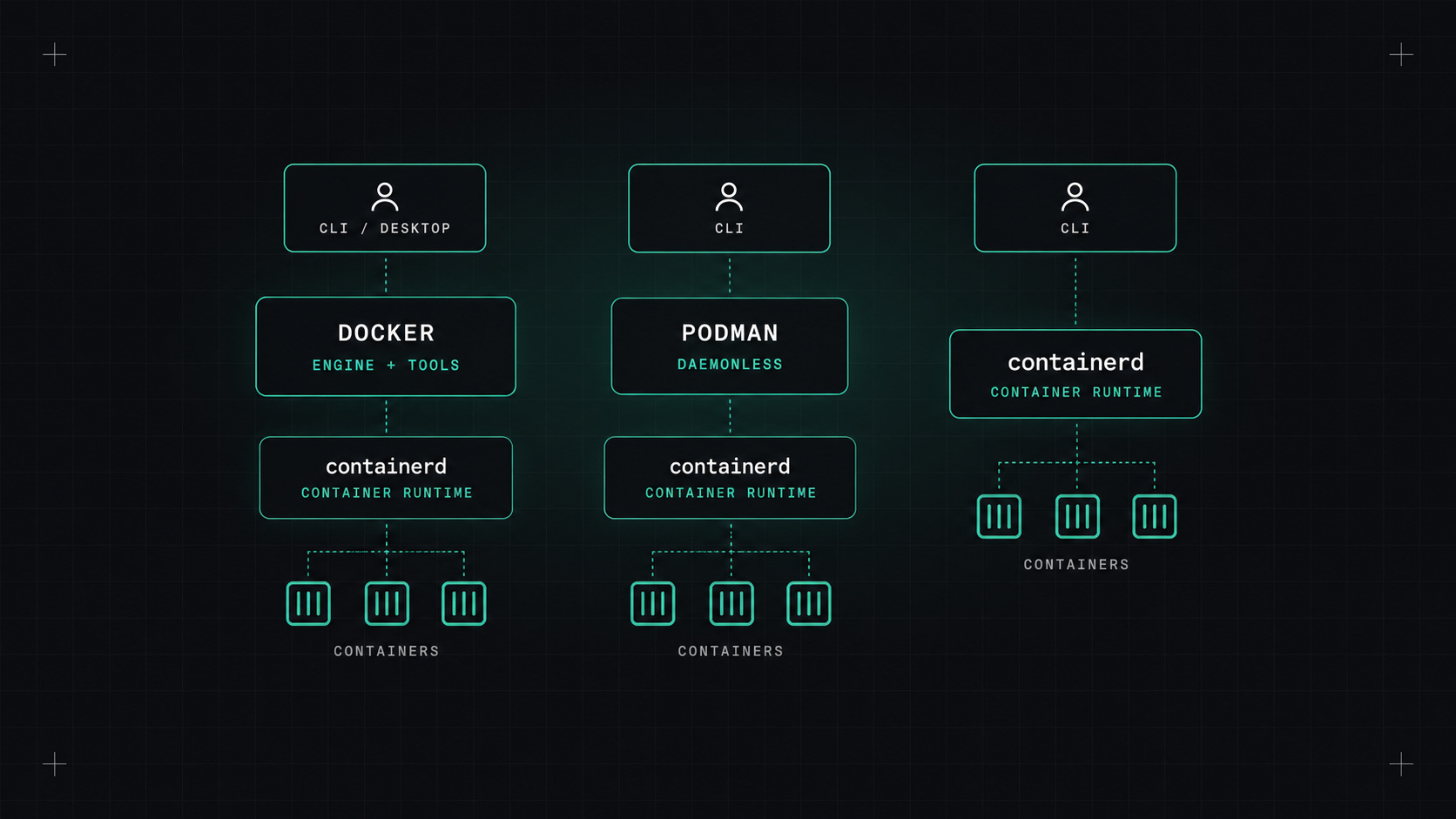
When people say "container", they often mean "Docker". But Docker is just one tool in a stack of layers, and in many places, Kubernetes included, Docker isn't involved at all anymore.
Understanding what's actually running your containers helps when debugging, choosing tools, and making sense of headlines like "Kubernetes removes Docker support" (which sounded scary in 2020 and turned out to be mostly harmless).
From bottom to top:
1. The Linux kernel. Containers aren't a kernel feature called "container". They're a combination of namespaces (isolating what a process can see: processes, network, files, users) and cgroups (limiting what it can use: CPU, memory, I/O). Every container runtime uses these.
2. Low-level runtime (OCI runtime). A small program that actually creates the container process with the right namespaces and cgroups. The standard one is runc. Alternatives include crun (faster, written in C), gVisor (extra isolation with a user-space kernel) and Kata Containers (each container in a lightweight VM).
3. High-level runtime. Manages images, storage, networking and the lifecycle of containers, and calls the low-level runtime. The main ones are containerd (a CNCF graduated project) and CRI-O (built specifically for Kubernetes).
4. Tools and interfaces. What humans and platforms talk to: the Docker CLI and engine, Podman, nerdctl, and Kubernetes' kubelet (through the Container Runtime Interface, CRI).
All of this is held together by OCI standards (Open Container Initiative): a standard image format and a standard runtime specification. That's why an image built with Docker runs with Podman, containerd or CRI-O.
A container is just a Linux process with blinkers on and a budget. Everything else is tooling around that idea.
Kubernetes talks to runtimes through the CRI. Docker Engine never implemented CRI directly, so Kubernetes used an adapter called dockershim. In Kubernetes 1.24 (2022), dockershim was removed.
What that meant in practice:
On a node, use crictl to inspect containers instead of docker ps:
crictl ps
crictl logs <container-id>
crictl images
Docker made containers popular and remains the most widely used developer tool for them: building images, running containers locally, Docker Compose for multi-container setups. Docker Engine itself uses containerd underneath.
Docker Desktop is the packaged app for macOS and Windows, which runs a Linux VM in the background. Since 2021, it requires a paid subscription for larger companies (more than 250 employees or more than $10 million in annual revenue). That pushed many organisations to look at alternatives.
Podman, from Red Hat, is a Docker-compatible alternative with a few important differences:
alias docker=podman works for most commands.podman kube generate).podman run --rm -p 8080:80 docker.io/library/nginx:1.27
If you need containers on macOS without Docker Desktop:
All of them run a small Linux VM, because containers need a Linux kernel.
"Docker" is a brand, a tool and a company. Containers are a Linux feature plus open standards. Once you see the layers, the choices become simpler: use whatever tool you like to build OCI images, and know that Kubernetes will run them with containerd or CRI-O regardless.
My take: learn the layers once, and you'll never be confused by a "Docker is dead" headline again.
— Desly